Shrike Dev Board Pin Outs
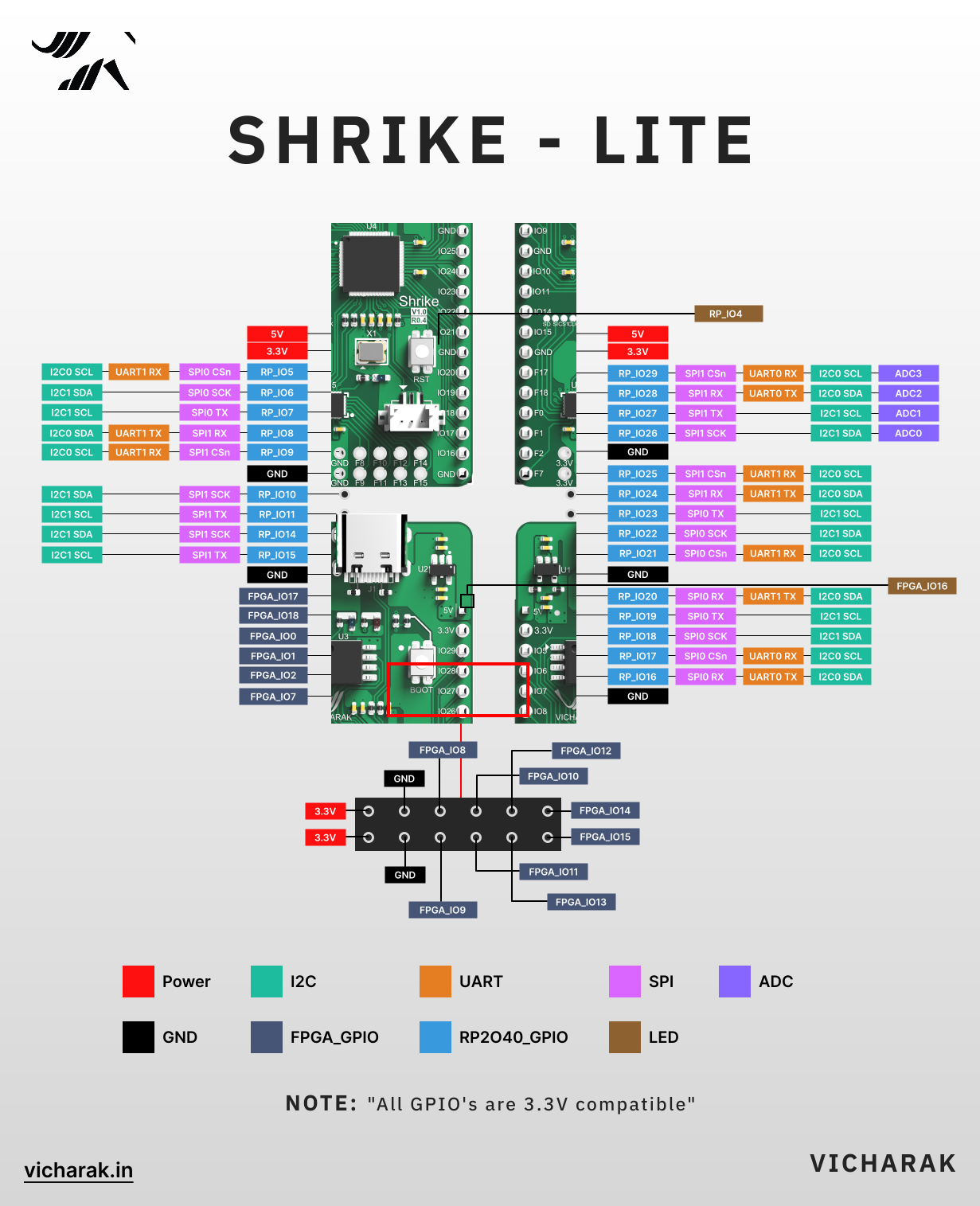
FPGA RP2040/RP2350 Communication Pin-outs
To make communication between RP2040/RP2350 and FPGA simple we have connected a 6 bit IO bus on the PCB . Its actually a 8 bit bus however 2 pin are always pre-occupied with EN and PWR pins these are used to reset and control the initialization of FPGA.
Out of remaining 6 pins, 4 pins are dual purpose which works both as configuration pins ( to program the fpga) and then IO bus. This pins are completely internally routed however test pads are available in the top of the board in case need arises to probe them.
The remaining 2 pins FPGA PIN 17 , 18 are both internally connected and routed to IO header , mode of can be configuration by soldering/de-soldering the 0ohm resistor on board (check schematic for details).
In default these resistor are placed and thus these pins are connected to respective RP2040/RP2350 IO (see table below) internally. Thus in this case it is recommended to NOT use them as IO on header even tho they are present. Same goes for RP2040 pin number 14 , 15.
User LED’s
The Shrike/Shrike-lite has two user LED’s one each for FPGA and MCU. The Pin Number for the same are
MCU LED - RP2040/RP2350 - GPIO04
FPGA GPIO16
FPGA CPU Interconnect Pin-outs
FPGA PIN |
RP2350/RP2040 PIN |
RP2350/RP2040 |
FPGA |
|---|---|---|---|
EN |
13 |
GPIO |
EN (Enable) |
PWR |
12 |
GPIO |
PWR |
3 |
2 |
GPIO |
SPI_SCLK |
4 |
1 |
UART RX / GPIO |
SPI_SS |
5 |
3 |
GPIO |
SPI_SI (MOSI) |
6 |
0 |
UART TX / GPIO |
SPI_SO (MISO) / CONFIG |
18 |
14 |
GPIO / I2C 1 SDA |
GPIO |
17 |
15 |
GPIO / I2C 1 SCL |
GPIO |
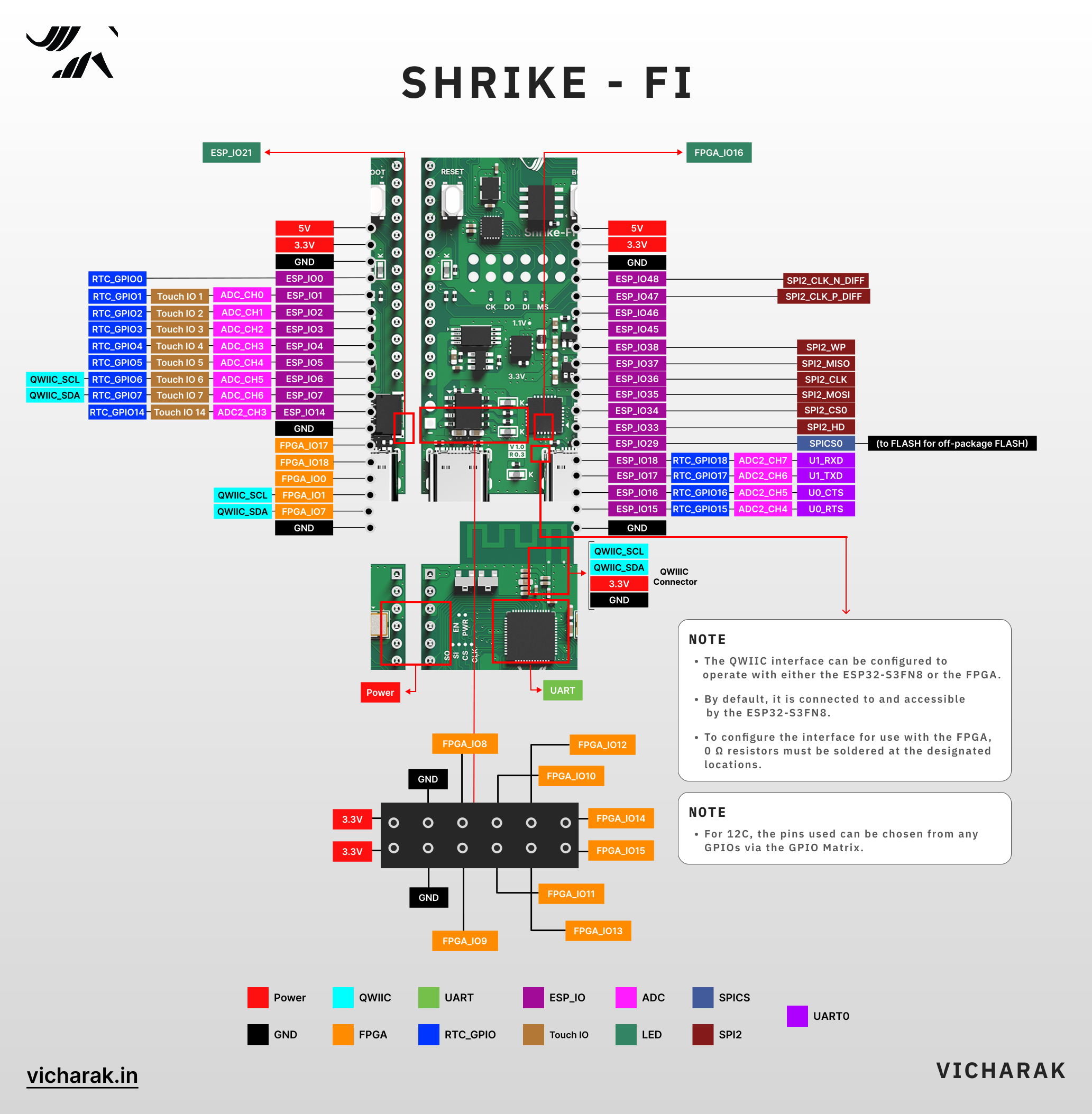
FPGA ESP32 Communication Pin-outs
To make communication between ESP32 and FPGA simple we have connected a 4 bit IO bus on the PCB . Its actually a 6 bit bus however 2 pin are always pre-occupied with EN and PWR pins these are used to reset and control the initialization of FPGA.
These 4 pins are dual purpose which works both as configuration pins ( to program the fpga) and then IO bus. This pins are completely internally routed however test pads are available in the top of the board in case need arises to probe them.
User LED’s
The Shrike-fi has two user LED’s one each for FPGA and MCU. The Pin Number for the same are
MCU LED - ESP32S3 - GPIO21
FPGA GPIO16
FPGA CPU Interconnect Pin-outs
FPGA PIN |
ESP32 PIN |
ESP32 |
FPGA |
|---|---|---|---|
EN |
9 |
GPIO |
EN (Enable) |
PWR |
8 |
GPIO |
PWR |
3 |
12 |
GPIO |
SPI_SCLK |
4 |
10 |
GPIO |
SPI_SS |
5 |
11 |
GPIO |
SPI_SI (MOSI) |
6 |
13 |
GPIO |
SPI_SO (MISO) / CONFIG |